Custom software · Sales follow-up
A LinkedIn CRM built as a Chrome extension: contacts, messages and sales reports
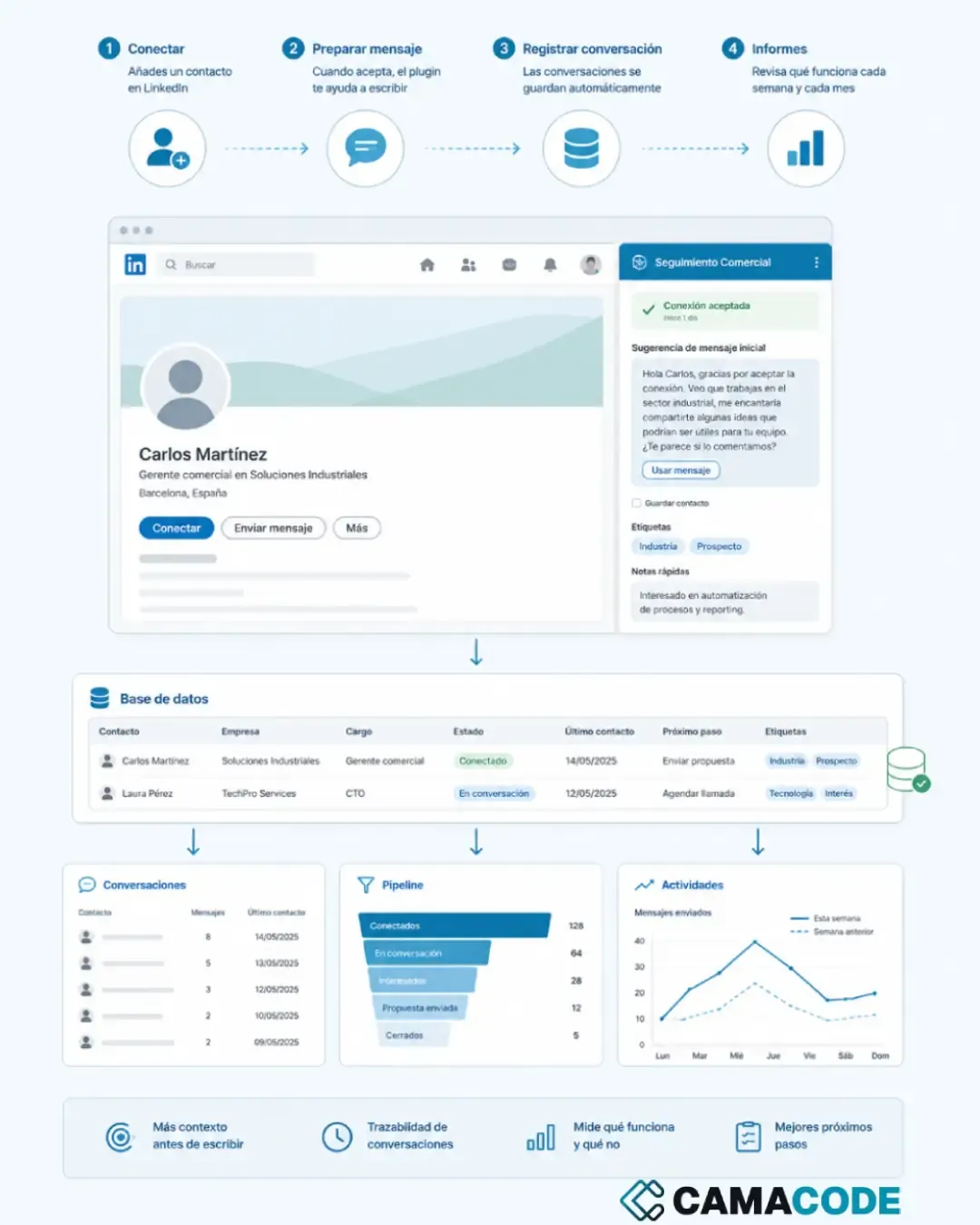
Camacode developed a LinkedIn CRM extension for Chrome: it saves the link to every contact's profile along with the context the salesperson adds, helps prepare the first message when a connection is accepted, logs conversations in a database and generates weekly and monthly reports on the sales process. Context and traceability, not mass messaging.

Written by Lluís Casals Marsol · Founder at Camacode
Published on
- Industry:
- B2B sales / services
- Solution type:
- LinkedIn CRM extension + sales follow-up database
- Services:
- Custom software development
The problem
Making contacts on LinkedIn is only the beginning. The hard part comes afterwards: remembering who accepted the connection, what message to send each person, which conversations were left open and what is actually working. When that sales follow-up depends on memory, scattered notes or a spreadsheet updated “when there’s time”, opportunities are lost, not for lack of interest, but for lack of a system.
The context
Anyone selling B2B services repeats the same cycle every week: identify interesting profiles, connect, write a first message when they accept, keep conversations alive and decide the next step. LinkedIn is the contact tool, but it isn’t built to manage that process: there is no pipeline, no structured history, no reports. And traditional CRMs live in another tab, so the information ends up never being recorded. In the screenshots we use fictional data and profiles; we never show real conversations.
The solution: a LinkedIn CRM extension for Chrome
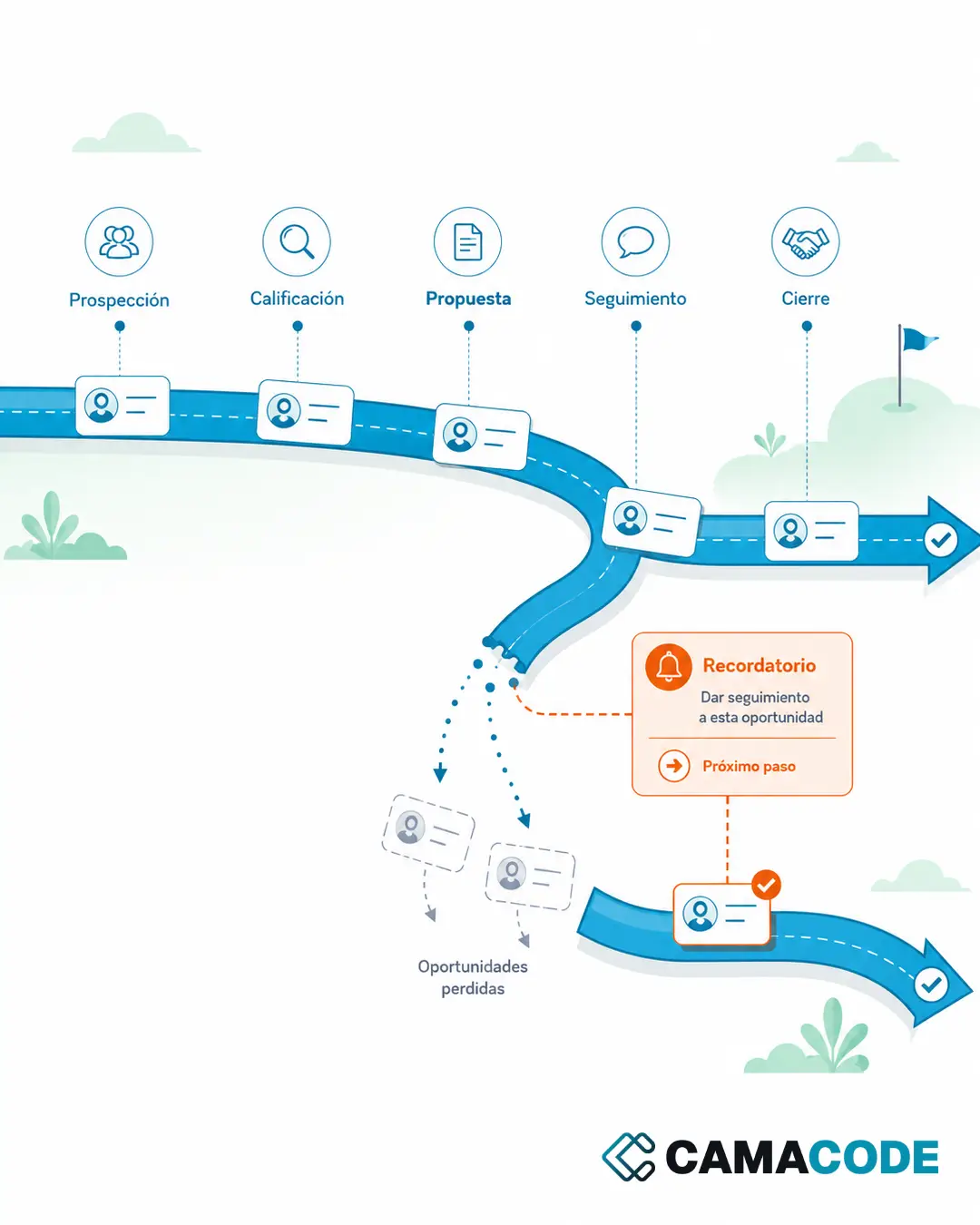
We created a LinkedIn CRM extension that works where the activity happens: inside LinkedIn. When you add a contact, the extension saves the link to their profile and the context you add about them: who they are, what they do, why you reached out. When the connection is accepted, it helps prepare a first message with all of that in view. Conversations are logged and, on that basis, the system generates weekly and monthly reports: how many contacts, how many replies, which conversations are still open and which approaches are working.
It is worth being precise about what the extension does and does not do, because it is the first question anyone asks. It does not crawl LinkedIn, it does not pull profiles in bulk and it does not build lists of people. It does not fire off message sequences and it does not operate the account on your behalf: you write and you decide. What it saves is the link to the contacts you are already managing, at the moment you tell it to, together with the notes you write yourself. LinkedIn’s terms of use expressly prohibit crawling the service or copying profiles with extensions, and that is precisely why the tool stays on the other side of that line: its job is to give memory to the sales work you already do, not to harvest anything.
Key features
- One-click contact capture: the link to the profile and your notes on the contact are saved with no copy-pasting.
- Context before writing: when picking a conversation back up, the contact’s full history is right there.
- Help with the first message: suggestions tailored to the profile, which the person always reviews and adjusts before sending.
- Conversation logging: full traceability of what was discussed and when, without relying on memory.
- Weekly and monthly reports: activity, replies and open conversations, to decide what to improve with data.
- Visible sales pipeline: where each opportunity stands and what the next step is.
Good practice: follow-up yes, spam no
It’s worth saying plainly: the purpose of this tool is not to automate LinkedIn, either for mass messaging or for harvesting profiles. Both things burn your network, damage the brand and go against the platform’s rules: LinkedIn’s terms of use prohibit crawling the service or copying profiles with extensions, and bulk messaging is the fastest way to get an account restricted. Here the person writes, decides and tells the tool what to save; the tool provides memory, context and measurement. It’s the difference between a salesperson with a good system and an account firing off templates: the first builds relationships, the second destroys them.
Results
The sales process stopped depending on memory. No open conversation is forgotten, every message is written with the context in view, and the reports make it possible to see what is working instead of guessing. The benefit is not sending more messages: it’s not losing opportunities for lack of follow-up, and improving the process with real information.
Do you have a similar process?
This pattern fits any team that sells services and whose follow-up lives somewhere between the LinkedIn inbox, email and a spreadsheet. You don’t always need a huge CRM: the best CRM for LinkedIn is usually the lightest one that sits right where the work happens. You may find how to track clients without losing information and how to automate repetitive tasks useful.
Does your sales follow-up depend on memory, scattered notes or a spreadsheet that’s never up to date? Tell us how you manage your opportunities today and we’ll look at what lightweight system would fit the way you sell.